 Launchie


Directe toegang
Open Launchie met Option + spatiebalk of je eigen sneltoets.
Klaar voor macOS 26 Tahoe en macOS 27
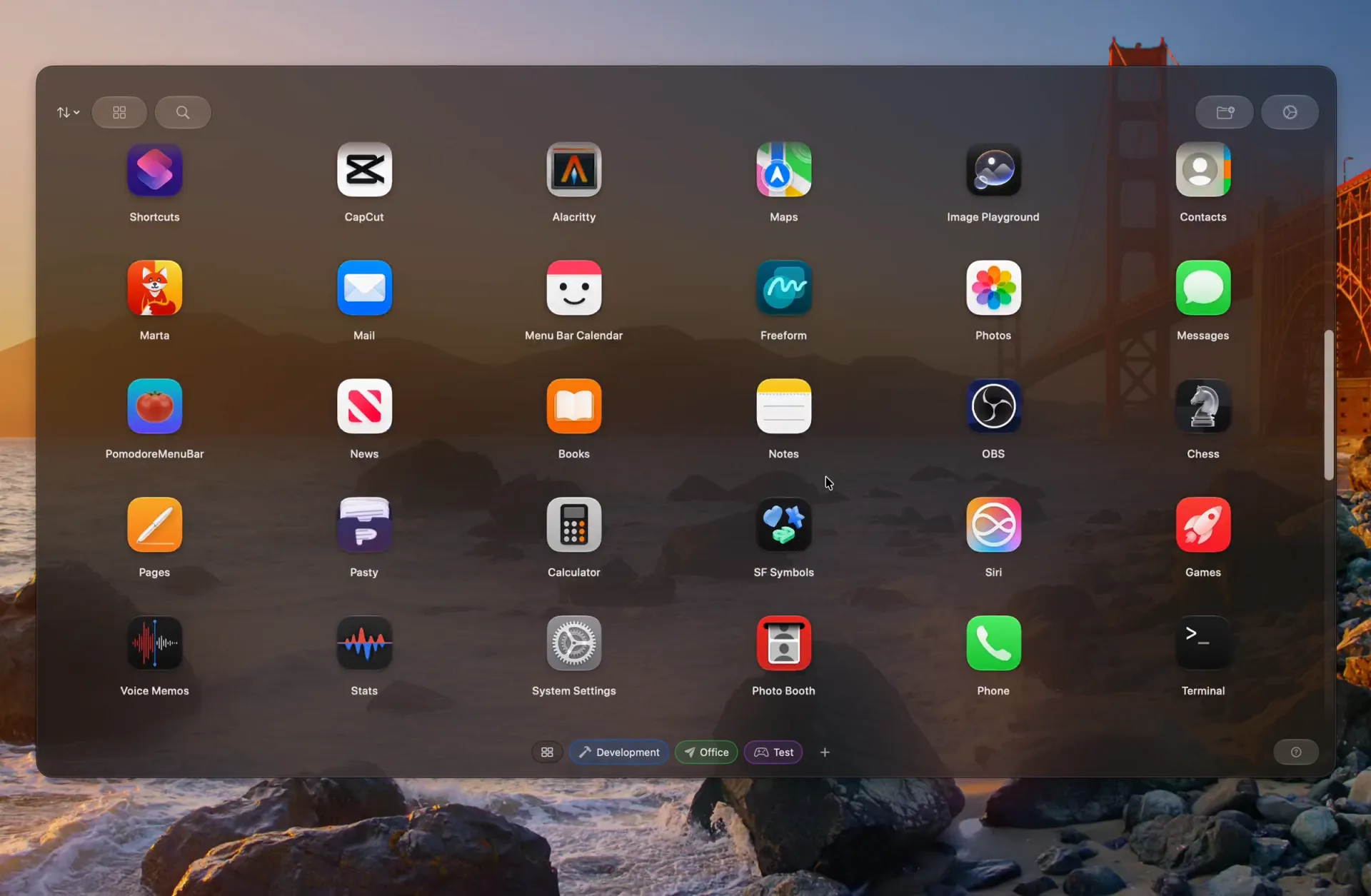
Je app-raster, je mappen, je indeling — de visuele launcher die macOS 26 verwijderde.
Uit de Mac App Store
Het beste van het klassieke Launchpad, gemoderniseerd.
Open Launchie met Option + spatiebalk of je eigen sneltoets.
Vind en start elke app binnen enkele seconden.
Zet apps precies neer zoals jij wilt.
Groepeer apps per project of categorie.
Bewaar je indeling en herstel die wanneer je wilt.
Open Launchie vanuit een gekozen schermhoek.
Houd je raster schoon door ongebruikte apps te verbergen.
Houd recente en veelgebruikte apps binnen handbereik.
Pas indeling, uitstraling en gedrag aan.
Importeer gratis je indeling uit het oorspronkelijke Launchpad, LaunchNext of LaunchOS. Open de introductiegids of Instellingen → Back-up in Launchie.
Het oorspronkelijke Launchpad naast vier alternatieven. Kies wat past bij je Mac en je werkwijze.
Veeg of scroll om alle vijf launchers te vergelijken.
| Vergelijk launchers, toen en nu | Launchie | LaunchOS | AppGrid | LaunchNext | Oorspronkelijk Launchpad (macOS 15 en ouder) |
|---|---|---|---|---|---|
| Indeling | Scrollbaar raster of lijst, met pagina’s genaamd Spaces | Pagina’s; scrollen met Pro | Pagina’s | Pagina’s | Pagina’s |
| Mappen | Onbeperkt, gratis | Ja | Gratis | Gratis | Ja |
| Aparte werkruimtes | Ja, Spaces | Niet vermeld | Niet vermeld | Niet vermeld | Nee |
| Recente en veelgebruikte apps | Recente, veelgebruikte en nieuwe apps | Niet vermeld | Niet vermeld | Niet vermeld | Nee |
| Oude Launchpad-indeling importeren | Gratis | Ja | Gratis | Gratis | Dit is al je indeling |
| Verkrijgbaar via | App Store, direct, Homebrew | Directe download | App Store en direct | Direct en Homebrew | Ingebouwd in macOS |
| Gratis en Pro | Gratis; optioneel Pro | Gratis; 7 dagen Pro proberen | Gratis; optioneel Pro | Gratis, open source | Inbegrepen bij macOS |
| macOS-ondersteuning | macOS 26+ | macOS 26+ | macOS 14.6+ | macOS 26+ | macOS 10.7–15 |
Het oorspronkelijke Launchpad was inbegrepen tot en met macOS 15. macOS 26 verving het door de Apps-weergave.
Gegevens over andere apps gecontroleerd op 1 okt 2026. Sommige functies vereisen Pro of de directe versie; bekijk prijzen en abonnementen in de volledige vergelijking. LaunchOS· AppGrid· LaunchNext· Apple
LaunchOS en AppGrid in detail (Engels) →LaunchNext in detail (Engels) →
Een korte rondleiding door Launchie 1.6.1 op macOS 27 en macOS 26.
Demonstratievideo van Launchie
Deze video wordt gehost door YouTube. Accepteer optionele cookies om hem te laden.
Deze aanvullende artikelen zijn beschikbaar in het Engels.
Lees wat veranderde en herstel een visuele app-launcher.
Vergelijk visuele launchers en toetsenbordtools.
Visueel bladeren, mappen en eigen organisatie voor macOS 27.
Twee benaderingen voor andere behoeften.
Visueel bladeren en ruimtelijk geheugen blijven nuttig.
Download Launchie en krijg de app-launcher die ontbreekt in macOS 26.

of installeer met Homebrew
brew install --cask launchieVereist macOS 26 Tahoe · Alle installatieopties
Nieuwsbrief
Ontvang versienotities, gidsen en praktische updates.