Launchpad was the Mac’s full-screen grid of app icons. It showed every installed app on swipeable pages, like the home screen of an iPhone or iPad, and let you arrange the icons and group them into folders. It came with every Mac from OS X Lion in 2011 to macOS 15 Sequoia.
Apple removed it in macOS 26 Tahoe and replaced it with a view called Apps. macOS 27 Golden Gate kept Apps, so on a current Mac there is no Launchpad anymore.
What Launchpad Did
Launchpad had one job: show you all your apps and let you open one with a single click. What made it popular was how much of the layout was up to you.
- A grid of every app. Everything in your Applications folder appeared as an icon, spread across pages you swiped between.
- Your own order. You could drag icons anywhere, and they stayed where you put them.
- Folders. Dropping one app onto another created a folder, which you could rename.
- Search. Typing as soon as Launchpad opened filtered the grid.
- Deleting App Store apps. Holding Option (or pressing and holding an icon) made the icons jiggle, and a small x deleted apps bought from the App Store.
Because the layout was yours, many people learned where each app lived and opened it without reading a single name. That spatial memory is exactly what they lost when Launchpad went away.
How You Opened Launchpad
| Shortcut |
Where |
| F4 |
The Launchpad key on most Mac keyboards |
| Pinch with thumb and three fingers |
On the trackpad |
| Rocket icon |
In the Dock or the Applications folder |
| Hot corner |
Optional, set in System Settings |
On macOS 26 and 27, the same F4 key and pinch gesture still work, but they open Apps instead.
Launchpad vs the Dock, Finder and Spotlight
Launchpad often gets confused with the other ways to open apps on a Mac:
- Applications folder (Finder): where apps are actually installed. Launchpad was only a view of that folder. Moving an icon or making a folder in Launchpad changed nothing on disk.
- Dock: the bar at the bottom of the screen, for a handful of apps you use constantly. Launchpad showed all of them.
- Spotlight: search. You type a name and press Return. Launchpad was for browsing when you did not want to type, or did not remember the name.
What Replaced Launchpad
In macOS 26 Tahoe, Apple replaced Launchpad with Apps, a view inside Spotlight. It opens with the old shortcuts, and it can show a list or a grid. The difference is who decides the layout:
|
Launchpad |
Apps (macOS 26 and 27) |
| Order of apps |
You arrange it |
Apple sorts it |
| Folders |
Your own, any name |
System categories only |
| Where it lives |
Full-screen, on its own |
Inside Spotlight |
| Opens with F4 and pinch |
Yes |
Yes |
If you mostly type an app’s name, Apps works well. If you relied on your own arrangement and folders, it feels like a step back. We cover why Apple made the change in Why Did Apple Remove Launchpad?
Can You Still Use Launchpad?
- macOS 15 Sequoia or earlier: yes, it is still there. Look for the rocket icon in the Dock.
- macOS 26 Tahoe or macOS 27 Golden Gate: no. There is no setting to turn it back on. See Where Is Launchpad on Mac? for how to check which version you have.
How to Get a Launchpad-Style Grid Back
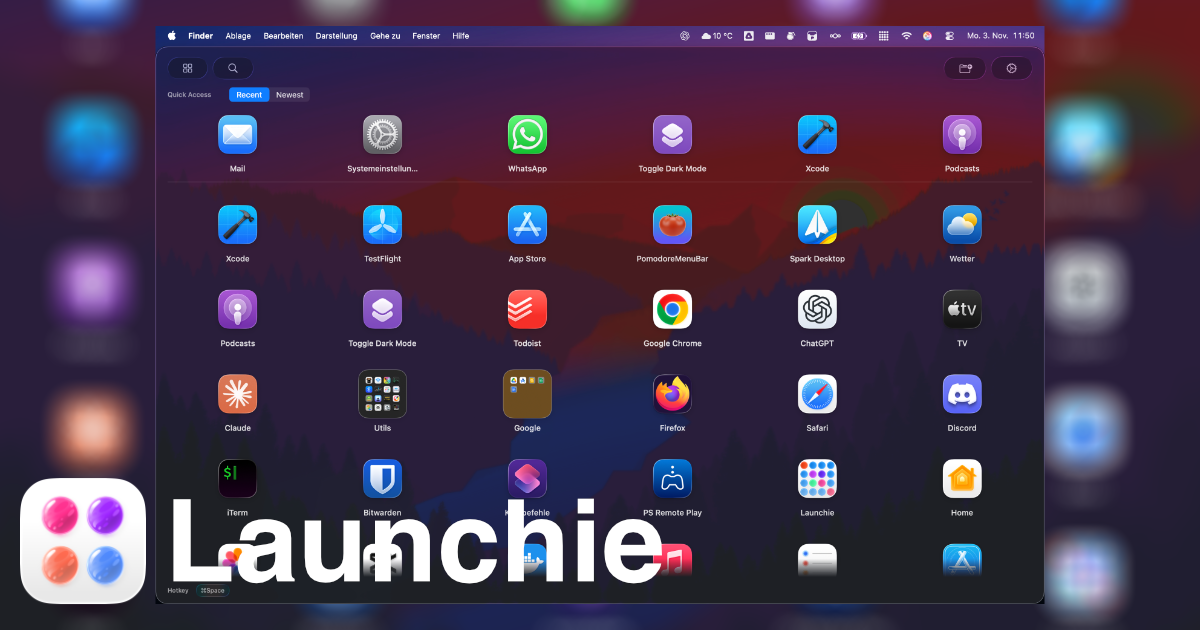
Launchie recreates Launchpad on macOS 26 and 27, and adds what Launchpad never had:
- A full-screen grid you arrange yourself, with folders, free and unlimited
- Spaces: separate pages of apps for work, games or design, switched with a swipe
- Search as you type, and Quick Access for recent and most-used apps
- In Pro, your desktop wallpaper blurred behind the grid, like the original, and in the direct download the pinch gesture opens Launchie instead of Apps
Install it from the Mac App Store, as a direct download, or with Homebrew:
brew install --cask launchie
Frequently Asked Questions
What is Launchpad on a Mac?
Launchpad was a built-in macOS feature that showed all your apps as icons in a full-screen grid, like an iPhone home screen. You could arrange the icons, group them into folders and open any app with one click. It shipped with every Mac from OS X Lion (2011) to macOS 15 Sequoia.
Is Launchpad still on the Mac?
No. Apple removed Launchpad in macOS 26 Tahoe and replaced it with Apps, a view inside Spotlight. macOS 27 Golden Gate keeps Apps and did not bring Launchpad back.
What replaced Launchpad on Mac?
Apps, a view inside Spotlight. It opens with the same F4 key and three-finger pinch, but Apple sorts the apps and groups them into its own categories, so you cannot arrange them or make your own folders.
What is the difference between Launchpad and the Applications folder?
The Applications folder in Finder is where apps are actually installed. Launchpad was only a view of those apps: moving an icon in Launchpad or putting it in a folder changed nothing on disk.
How do I get Launchpad back?
macOS 26 and 27 have no setting to restore it. A replacement such as Launchie brings back the full-screen grid with your own arrangement and folders.
Related Articles
 Launchie