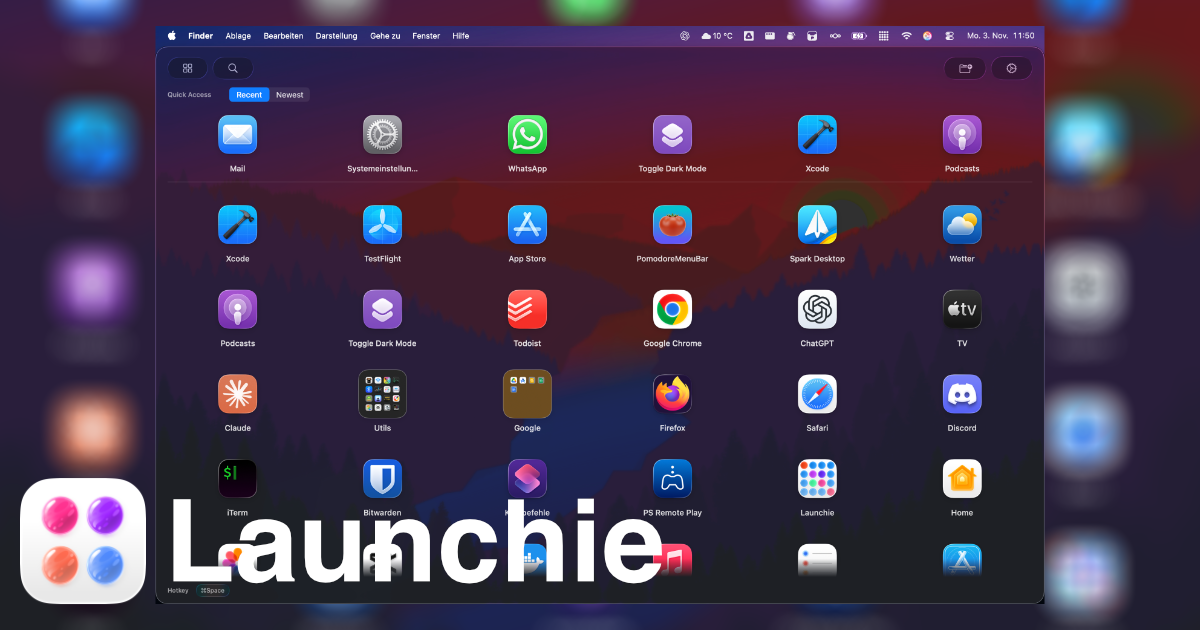
Launchpad was the Mac’s full-screen grid of apps for fourteen years, from OS X Lion in 2011 to macOS 15 Sequoia. In macOS 26 Tahoe, released in September 2025, Apple removed it and replaced it with Apps, a view inside Spotlight. macOS 27 Golden Gate kept Apps.
So why did Apple do it, what exactly changed, and how do you get the old grid back?
What Launchpad Was
Launchpad brought the iPhone home screen to the Mac:
- A full-screen grid of every installed app, across swipeable pages
- Your own layout: drag icons into any order, and they stay there
- Folders: drop one app onto another to group them
- Search by typing as soon as it opened
- F4, a trackpad pinch or the rocket icon in the Dock to open it
Because people arranged it themselves, many opened apps from memory of where they were rather than what they were called. More on the basics in What Is Launchpad on Mac?
Why Did Apple Remove Launchpad?
Apple has not given a public reason. It did not announce the removal as a feature of its own. At WWDC in June 2025 it presented a redesigned Spotlight that includes an Apps view, and when macOS 26 Tahoe shipped, Launchpad was gone and the old shortcuts opened Apps instead.
What the change itself suggests - our reading, not Apple’s words:
- One place to find things. App launching moved into Spotlight, next to files, actions and shortcuts, instead of living in a separate full-screen view.
- Matching the iPhone. Apps sorts your apps into automatic categories, much like the App Library Apple added to the iPhone in iOS 14.
- Search over arranging. The new design assumes you type what you want. Launchpad assumed you would lay things out and browse.
What Changed for Launchpad Users
|
Launchpad |
Apps (macOS 26 and 27) |
| Order of apps |
You arrange it |
Apple sorts it |
| Folders |
Your own, any name |
System categories only |
| Where it lives |
Full-screen, on its own |
Inside Spotlight |
| Opens with F4 and pinch |
Yes |
Yes |
If you mostly type an app’s name to open it, Apps works well. If you relied on your own arrangement and folders, there is no setting that brings them back.
How People Reacted
The removal drew a steady stream of questions and complaints, for example in Apple’s own support forums (“Why is the launchpad gone?”, “macOS Tahoe removed Launchpad folders — how to organize apps now?”). The most common complaint is the one in the table above: the custom layout and folders are gone.
It also started a wave of third-party replacements - Launchie, LaunchOS, AppGrid, LaunchNext and others - which is the only way to get a Launchpad-style grid back on macOS 26 and 27.
How to Get a Launchpad-Style Grid Back
macOS 26 and 27 have no setting that restores Launchpad. The only way back to a grid you arrange yourself is a third-party launcher.
Launchie
Launchie is a Launchpad replacement for macOS 26 Tahoe and macOS 27. It keeps what people missed and adds what Launchpad never had:
- Your own layout: a full-screen or windowed grid you arrange by dragging
- Folders: drop one app onto another, as many as you like, in the free version
- Spaces: separate pages of apps for work, personal or projects, switched with a swipe
- Quick Access: recent, most used and newest apps in a row above the grid
- Instant search and a keyboard shortcut to open it, Option-Space by default
Launchie Pro adds your desktop wallpaper blurred behind the grid, like the original, plus hot corners, hidden apps, favourites, per-display window profiles and layout backups. In the direct download, the trackpad pinch can open Launchie instead of Apps. Pro is $14.99 once, or monthly or yearly on the Mac App Store; the App Store purchase works with Family Sharing, and a direct licence covers up to five Macs.
Other options
- LaunchOS rebuilds the old Launchpad pages as literally as possible and can import your old layout. Direct download only.
- AppGrid also uses pages, imports your layout and runs on older macOS versions too.
- Raycast and Alfred are excellent keyboard launchers, but they search rather than let you browse and arrange.
All three visual launchers side by side: Launchie vs LaunchOS vs AppGrid.
Installing Launchie
Pick whichever way you normally install Mac apps:
- Mac App Store: search for “Launchie”, or use the link on launchie.app
- Direct download: from launchie.app/installation
- Homebrew:
brew install --cask launchie
On first launch, Launchie lays out all your apps in a grid. Drag them into the order you want, build your folders, and set up Spaces if your Mac does more than one job.
Frequently Asked Questions
Why did Apple remove Launchpad?
Apple has not given a public reason. It replaced Launchpad with Apps, a view inside the redesigned Spotlight, which sorts apps into automatic categories like the iPhone’s App Library. The change moves app launching toward search and away from a layout you arrange yourself.
Did Apple remove Launchpad in macOS 26 Tahoe?
Yes. Apple removed the classic Launchpad in macOS 26 Tahoe and replaced it with the new Apps interface. The Apps view opens from Spotlight and lists your applications, but it does not behave like the old fullscreen app grid with folders and drag-and-drop pages.
Is Launchpad back in macOS 27?
No. Launchpad is still gone in macOS 27 Golden Gate. Apple kept the Apps interface, so if you want the Launchpad grid on macOS 27 you need a third-party launcher such as Launchie.
What replaced Launchpad in macOS Tahoe?
Apple moved app launching into the Apps interface and Spotlight-style discovery. That works well for searching by name, but it is not the same as Launchpad’s visual browsing, folders, and custom app organization.
What is the best macOS 26 Launchpad replacement?
If you want a visual app grid with folders, Spaces, and customization, Launchie is built specifically for that workflow. Keyboard-first tools like Raycast and Alfred are excellent, but they solve a different problem: they search, they do not let you browse and arrange your apps.
Conclusion
Apple replaced Launchpad with a view built around search, and has not said why. For people who type an app’s name, little changed. For people who relied on a layout they arranged themselves, it was a real loss, and macOS 27 did not reverse it.
That layout can come back. A launcher like Launchie restores the grid and folders, and adds Spaces and Quick Access on top.
Related Articles
 Launchie