uDock doesn’t just mimic Launchpad—it builds an entire modular dashboard with sidebars for running processes, mounted volumes, and even quick text snippets. If you love tweaking every pixel, it’s a playground. But that flexibility comes at the cost of complexity, manual population, and visual overload. Launchie strikes a healthier balance: it’s powerful on day one and still adapts as your workflow changes.
Getting Started
- uDock: Ships with empty panels. You manually add each favorite app, decide which sidebars you want, and configure reiters to organize content. Power users might enjoy that blank canvas, but casual users face a long setup.
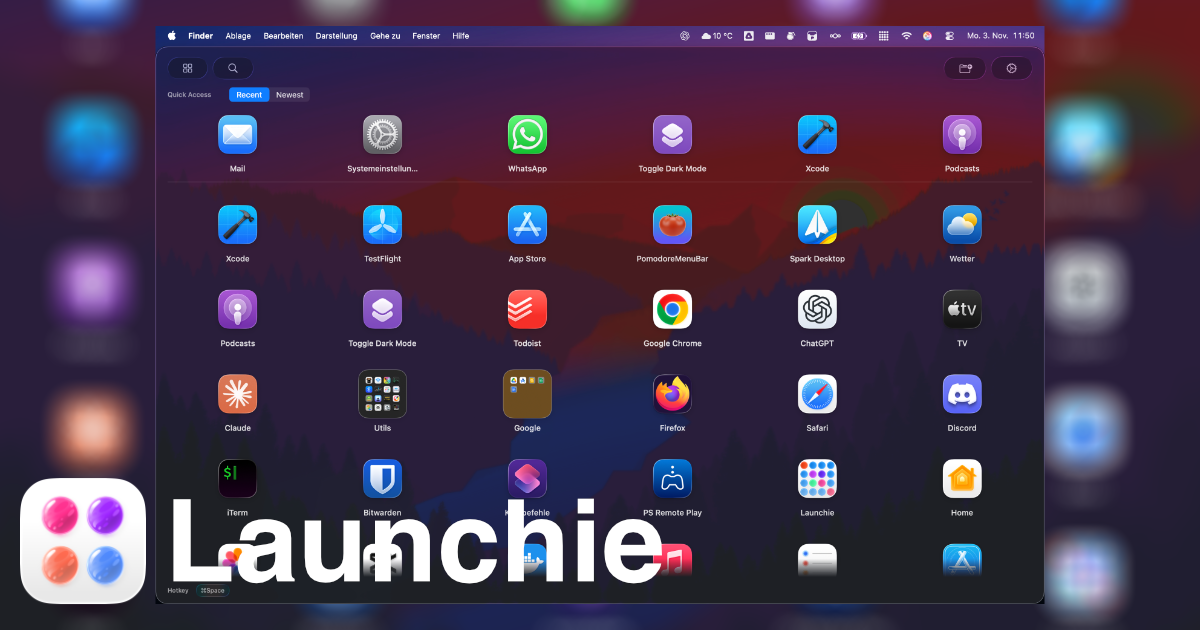
- Launchie: Automatically indexes your Applications folder and displays everything immediately. You can start launching apps in seconds, then fine-tune folders, filters, and layouts at your own pace.
For busy professionals, “already populated” beats “spend an evening configuring” every time.
Interface Philosophy
uDock combines a vertically scrolling area with optional sidebars and a customizable footer. Fully maxed out, it resembles an iPad home screen surrounded by diagnostic panels. That’s great for geeks—less so for anyone who just wants to launch apps without distractions.
Launchie keeps the interface clean:
- Scrollable grid or list that mirrors Launchpad/Tahoe muscle memory
- Optional quick-access ribbon for recents/favorites/new installs
- Folders for categorizing apps without summoning extra UI chrome
- Hot-corner, keyboard, dock, and menu bar activation
It’s the difference between a cockpit and a fast, focused launcher.
Performance and Maintenance
uDock lets you mix apps, files, scripts, and snippets, but that also means you maintain everything manually. Change Macs? Plan to recreate those setups, because there’s no layout backup.
Launchie Pro includes configuration backup/restore, so migrating to new hardware or experimenting with new layouts is safe. And because Launchie doesn’t rely on data from external volumes or manual entries, it stays synced with whatever is installed on your Mac automatically.
Customization That Matters
uDock offers seemingly infinite customization: colors, icon placement, shadow intensity, hover behaviors, and more. It’s impressive—but can become a rabbit hole.
Launchie focuses on the tweaks that improve productivity:
- Theme presets (Glass or Sheet) with adjustable transparency
- Icon and font sizing for readability
- Folder management, drag-and-drop, and context menu actions
- Quick filters that spotlight what changed recently
By emphasizing practical options, Launchie keeps you focused on launching apps rather than crafting visual art projects.
Pricing
| Feature |
uDock |
Launchie |
| Trial |
14 days |
Free |
| Full license |
€18 or €9/year |
Free / €18 Pro |
| Auto-populated catalog |
No |
Yes |
| Layout backup |
No |
Yes (Pro) |
| Sidebars for volumes/processes |
Yes |
– |
| Quick-access ribbon |
– |
Yes |
The pricing is similar, but Launchie offers more value upfront because you don’t need to configure everything manually.
Verdict
Choose uDock if you crave endless experimentation and want to build a personalized control center from scratch. Choose Launchie if you prefer a launcher that’s ready in minutes, stays responsive with huge app libraries, and still lets you make it yours through thoughtful customization. For most Mac users seeking a Launchpad replacement, Launchie delivers the best mix of productivity, polish, and personalization.
Experience a launcher that respects your time. Download Launchie and get organized instantly.
 Launchie